Rugged Leather Skin: A Practical Guide for Designers and Business Owners
For designers, entrepreneurs, and creative professionals, Rugged Leather Skin offers a versatile solution to add texture, depth, and authenticity to digital and physical projects. Whether you're working on mobile device skins, furniture upholstery, or graphic design elements, this digital pattern pack provides a realistic leather look that can elevate your work. But like any tool, it’s important to understand how to use it effectively to avoid common pitfalls.
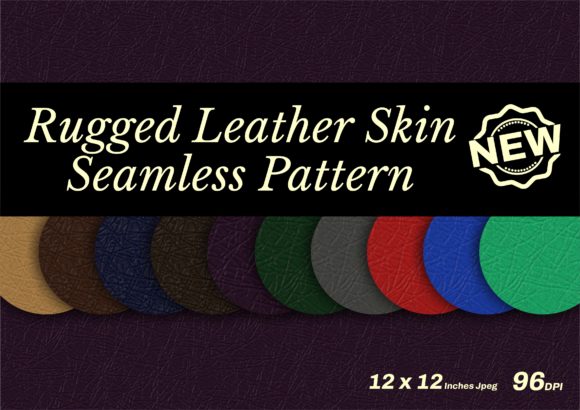
Rugged Leather Skin is more than just a visual effect—it’s a digital representation of natural leather that mimics its rugged texture, grain, and imperfections. This makes it ideal for creating custom designs for products such as phone cases, laptop covers, and even furniture. With 10 color options and a seamless pattern format, it’s easy to integrate into Adobe Photoshop or Illustrator workflows.
Common Mistakes When Using Rugged Leather Skin
Many users overlook key details when selecting or applying Rugged Leather Skin, which can lead to subpar results. One common mistake is not checking the resolution and file format before downloading. The patterns are provided as 1200px JPGs at 96 dpi, which is suitable for digital use but may not be ideal for high-resolution printing. If you plan to use the skin on physical products, ensure your project requirements match the file specifications.
Another mistake is assuming that all leather textures are the same. While Rugged Leather Skin offers a realistic look, it’s important to consider how it will interact with other design elements. For example, using a heavy texture over a minimalist logo could make the design feel cluttered. Always test the pattern in context before finalizing your project.
How to Avoid Common Pitfalls
To get the most out of Rugged Leather Skin, start by understanding your project needs. Ask yourself: Will this texture be used digitally or physically? What is the intended audience? How will it complement other design elements? These questions can help you decide whether Rugged Leather Skin is the right choice and how to apply it effectively.
When working with seamless patterns, pay attention to how the texture repeats. A poorly aligned pattern can create visible seams, especially in large areas. Use tools within Adobe Photoshop or Illustrator to adjust the pattern’s alignment and scale. This ensures a smooth, professional finish without unwanted visual disruptions.
Additionally, don’t assume that more complex textures always mean better results. Sometimes a subtle leather effect can be more impactful than an overly detailed one. Consider the purpose of your design and choose a texture that enhances rather than overwhelms.
What to Check Before Using Rugged Leather Skin
Before downloading or purchasing Rugged Leather Skin, verify that it meets your project’s technical requirements. Check the file format (JPG), resolution (1200px), and dimensions (12 x 12 inches). These details determine how well the pattern will scale and fit your design needs.
Also, review the licensing terms. Some digital assets come with restrictions on commercial use, redistribution, or modification. Make sure you understand what you’re allowed to do with the patterns to avoid legal issues down the line.
Finally, consider the source of the product. While Rugged Leather Skin may be available from various platforms, not all providers offer the same quality or support. Choose a reputable supplier that provides clear documentation and customer assistance if needed.
Realistic Examples and Better Approaches
Imagine you’re designing a phone case for a client who wants a rugged, durable look. Instead of applying the full texture directly, try using it as a background layer with a semi-transparent overlay. This creates a subtle, realistic effect without overwhelming the design. You can also experiment with blending modes in Photoshop to achieve a more natural integration.
For furniture upholstery, consider using Rugged Leather Skin as a reference for hand-drawn textures or fabric samples. This allows you to maintain control over the final appearance while still achieving the desired aesthetic. Combining digital patterns with physical materials can result in a more authentic and customized outcome.
If you’re working on a marketing campaign, use Rugged Leather Skin to create a cohesive visual identity across different mediums. From social media posts to printed brochures, a consistent texture can reinforce brand messaging and create a stronger connection with your audience.
Final Thoughts on Rugged Leather Skin
Rugged Leather Skin is a valuable resource for anyone looking to add realism and character to their designs. However, its effectiveness depends on how well you understand its capabilities and limitations. By avoiding common mistakes, checking technical details, and experimenting with different applications, you can maximize the value of this digital asset.
Whether you’re a beginner exploring new design tools or a professional seeking efficiency, Rugged Leather Skin offers a practical solution that can enhance your creative process. With the right approach, it can become a go-to resource for adding texture, depth, and authenticity to your work.